Price Increase Messaging: How to Announce a Price Hike Without Losing Customers
How to execute a price increase messaging right?


Price increase messaging is the plan for what you say, when you say it, and through which channel, before you raise your prices. Conventional wisdom says bury the number under value and reasoning. We tested that instinct against a price-first version in Articos, and the results weren’t as clean as the conventional wisdom suggests – the full breakdown is below.
This guide covers the framing, the channels, a working email template, and the real test data behind which order actually works, not just which one sounds right in a meeting.
How Do You Message a Price Increase?
Four things need to be in the message somewhere: what the customer is getting, not just what they’re paying – new features, better support, or infrastructure that’s kept the product running; the real reason for the change, stated plainly, without hiding behind a euphemism; the new price and effective date; and an easy next step, whether that’s a question, a call, or nothing at all if no action is required. Which of these opens the message is the part conventional wisdom oversimplifies – our own test further down found the answer depends on whether clarity or trust is the bigger risk for your audience.
Harvard Business Review’s research on price increase communication backs this order specifically: buyers respond better to direct language than to soft terms like “price adjustment,” and they respond better still when the reasoning behind the increase is spelled out rather than implied. Leading with the number instead triggers loss aversion before the reader has any context to weigh it against – the same dollar increase reads very differently depending on what comes first.
How Do You Announce a Price Increase to Customers?
The announcement itself is a sequencing problem as much as a writing one.
- Decide the channel mix first. Email carries the primary message. In-app banners catch people who don’t read email. A landing page holds the FAQ so support doesn’t have to repeat itself in every ticket.
- Give real notice. Common practice is 30 days minimum for consumer products and 60–90 days for B2B contracts tied to renewal cycles. Customers need time to budget, not just time to read – and transparency about timing is as much a part of retention as the reasoning is.
- Time it to a milestone. Announce after you’ve shipped something, not in a quiet month. A price increase that follows a visible improvement needs far less justification than one that arrives out of nowhere.
- Brief support and sales before customers see it. Nothing undercuts a carefully worded announcement like a support agent who’s hearing about the change from an angry customer.
- Segment the message. Long-tenured customers, price-sensitive plans, and enterprise accounts each need a different version – not a different truth, a different level of detail.
| Channel | Best for | Watch-outs |
| Direct email | The primary announcement, all customers | Needs a clear subject line – vague ones get skipped |
| In-app banner | Active users who skim email | Should link to the same FAQ as the email, not a shorter version |
| Personal call or account note | High-value or at-risk accounts | Reserve for accounts where losing them changes the quarter |
| Price increase letter | Regulated industries, formal B2B contracts | Slower, but often contractually required |
| Social media / blog post | Never as the primary channel | Reads as evasive when it’s the first place customers hear the news |
What Do Good Price Increase Announcement Examples Look Like?
A subscription tool raising its mid-tier plan from $49 to $59 opened with what had shipped since the last price change: two new integrations, a faster export tool, and a support response time cut in half. The price came in the fourth sentence, with 45 days’ notice and a note that annual plans could lock in the old rate for one more renewal.
A services firm handling a 12% fee increase skipped the email entirely for its top ten accounts. Account managers called first, walked through the reasoning, and sent the letter as a follow-up rather than the announcement itself. The email version went to everyone else.
Neither example buries the number entirely, and both put real thought into where it lands relative to the reasoning – worth noting, per the test below, that burying it too deep isn’t automatically the safer choice either.
What Should a Price Increase Email Template Include?
A working template needs six parts, in this order:
| Subject: Your [Product] plan is changing on [date] Hi [Name], Since [reference point – last increase, launch, etc.], we’ve [1–2 concrete improvements: features shipped, capacity added, support changes]. Starting [effective date], your [plan name] will move from [old price] to [new price] per [billing period]. This reflects [the real reason – rising infrastructure costs, expanded team, inflation]. Your next bill will be on [date]. No action is needed unless you’d like to [downgrade / talk to us / see the FAQ]. Questions? Reply directly – a real person reads this inbox. [Name / Team] |
Keep the subject line specific. “An update on your account” gets ignored; “Your [Product] plan is changing on [date]” gets opened, because it tells the reader exactly what’s inside before they click.
How Do You Tell Customers About a Price Increase Without Triggering Churn?
Churn after a price increase rarely comes from the price itself – it comes from customers who feel the decision was made without them in mind. Two things lower that reaction reliably: telling people why, and telling them early enough to plan.
Grandfather existing customers where the math allows it, even for a single renewal cycle. A 60-day grace window costs less than the support tickets and cancellations that come from a same-day surprise. And route every reply to a real inbox for the first two weeks – the questions that come back tell you more about how the message landed than any open rate will.
When Should You Use a Price Increase Letter Instead of an Email?
A formal letter earns its place in three situations: the contract requires written notice, the relationship is B2B and the buyer expects paper trail documentation, or the account is large enough that a letter signals the seriousness email doesn’t. For everyone else, email does the job faster and gets read sooner.
When a letter is required, don’t let it replace the conversation. Send the letter to satisfy the contract, and have the account manager call or email separately to walk through the reasoning in plain language.
How Do You Soften a Price Increase Message?
“Softening” a price increase message doesn’t mean hedging the number – it means removing the parts that make customers defensive before they’ve read your reasoning. A few things do that reliably: naming a fixed increase percentage instead of a vague “may vary” range, offering a locked-in rate for existing customers even briefly, and closing with a genuine invitation to reply rather than a generic “let us know if you have questions.”
What doesn’t work is minimizing the change itself. Calling a 20% increase “a small adjustment” reads as condescending, and customers notice the gap between the word and the number within seconds.
We Tested Three Price Increase Framings – Here’s What Actually Won
Most teams write the price increase email, get three internal opinions on tone, and send it to the entire customer base at once. That’s a one-way door – you can’t un-send a price increase, and by the time replies start coming in, you already know how it landed.
We ran the opposite process on our own Starter plan copy. Three variants, same underlying facts – a $79 to $99/month increase, three shipped improvements (bigger persona library, faster analysis, priority support), infrastructure-cost reasoning, and a grace period for annual customers – with only the order changed, tested against an SMB persona on the lowest-priced plan, 6–12 months’ tenure, no enterprise contract.
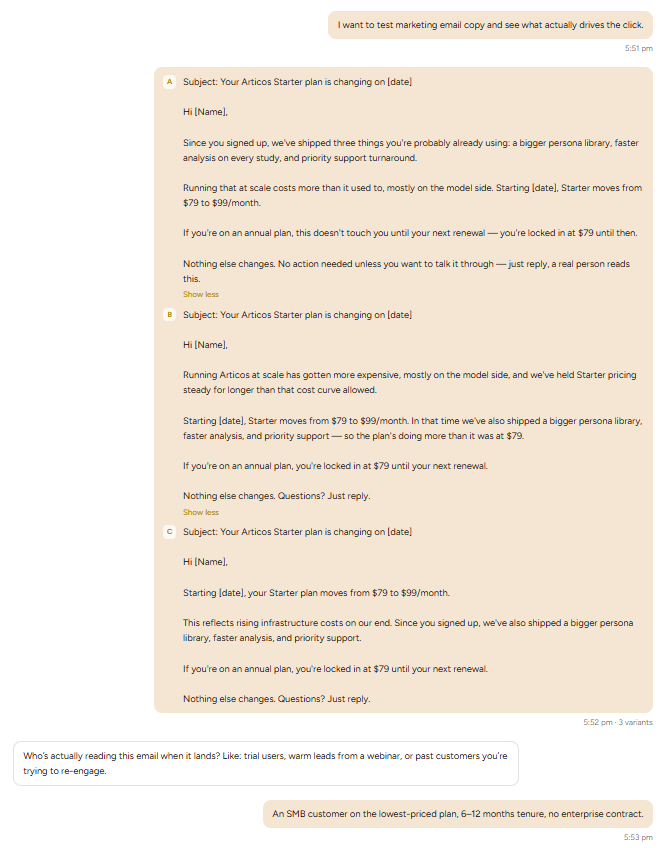
- Variant A – value-first: shipped improvements, then reasoning, then price.
- Variant B – reason-first: cost reasoning up front, value second, price third.
- Variant C – price-first: the price and effective date open the email; value and reasoning follow.
Across 9 synthetic personas and 18 themes, price-first won on overall score – 7.1/10, the strongest of the three, a 0.45-point gap over the second-place variant per the report’s own scoring, driven largely by comprehension (9.0/10): readers understood exactly what was happening on a first skim. Value-first placed second at 6.7/10, scoring well on brand voice and comprehension but not matching variant C’s clarity. Reason-first placed last at 5.8/10 – leading with the company’s own cost pressures, before establishing any value, read as vendor-centered rather than customer-focused.
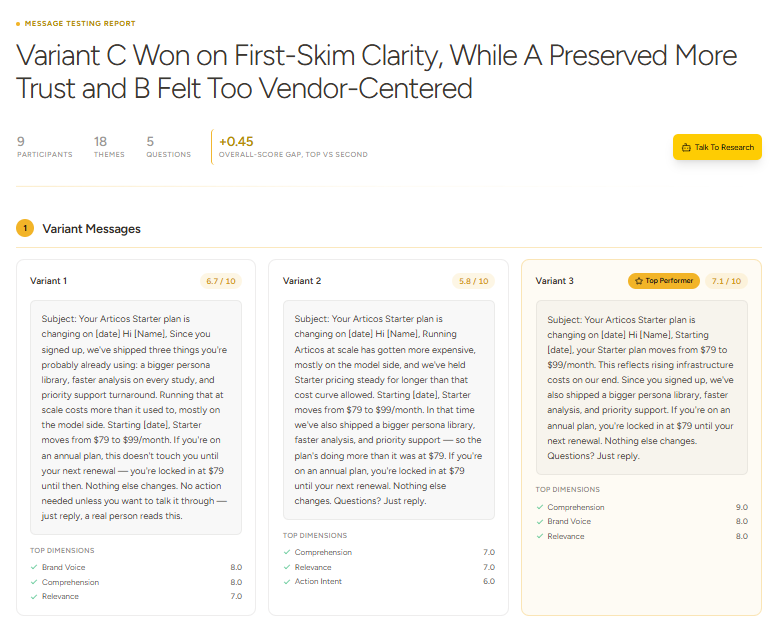
That complicates the “value first” advice earlier in this guide. What it doesn’t complicate is the HBR-backed point about euphemisms and stated reasons: reason-first didn’t lose because it explained the “why,” it lost because it explained the “why” before the reader had any value to weigh it against. The order that failed hardest wasn’t “state the reason” – it was “state the reason first.”
The practical read: if clarity is the bigger risk for your segment – a busy, low-touch audience skimming on mobile – price-first tests better. If trust is the bigger risk – a segment more likely to feel blindsided or nickel-and-dimed – value-first is the safer default. Leading with your own cost pressures, ahead of any value, tested worst in both directions and is worth avoiding regardless of segment.
One honest caveat: this is a single test, one segment, nine personas, one company’s specific pricing move. It’s a real result, not a universal law – worth replicating against your own customer segments before treating it as a rule, especially if your audience or price point looks different from the SMB Starter-tier profile tested here.
Articos’s messaging testing platform is what ran this test – it scores a message against synthetic personas built on your actual customer segments and returns results like the ones above in under 30 minutes, fast enough to test a framing the same day you plan to send it. This isn’t a substitute for real customer conversations after the fact – it’s a way to rule out the version that was always going to land badly before it reaches anyone’s inbox. If you’re comparing message-testing tools more broadly, our breakdown of Articos versus Wynter covers how the two approaches differ.
What’s the Cheapest or Free Option for Testing Price Increase Messaging?
The free version of this workflow is a short list of real customers. Send two draft versions to 5–10 existing accounts you already have a relationship with, or drop both into a customer advisory Slack channel, and ask directly which reads as fair. It’s slow and it’s a small sample, but it catches an obviously bad framing before a wider send.
The next step up is an A/B email test on the announcement itself – different subject lines or opening paragraphs to two segments, measured on open and reply rate rather than final reaction. Neither approach tells you why a version failed the way a synthetic interview does, but both are free and better than sending on gut instinct alone.
Should You Combine Synthetic and Human Research, or Choose One?
Combine them – this isn’t an either/or decision. Synthetic testing is fast and cheap enough to run on every draft, which makes it the right tool for ruling out the versions that were always going to land badly. Human conversations – a call with your ten largest accounts, a handful of real customer replies – are slower and more expensive, which makes them the right tool for the final check before a price increase actually ships.
Articos’s AI user research platform is built for this first pass; a deeper comparison of when synthetic answers hold up against real customer behavior, and where they don’t, is in synthetic users vs. real users.
What Makes Price Increase Communication Effective?
Effective price increase communication – some teams call it price change messaging instead, the underlying rules are identical either way – has three things wrong versions usually skip: a specific reason, real advance notice, and a channel that matches the size of the account. None of it requires clever copywriting. It requires being transparent about why the price is changing, choosing an order that matches whether clarity or trust is the bigger risk for this segment, and giving people enough runway before renewal or cancellation to plan for it.
One honest limitation worth naming: no amount of message testing fixes a price increase that isn’t backed by real value. If the product hasn’t improved and the increase is pure margin protection, testing framing will tell you which version of that message churns fewer people – it won’t make the underlying decision easier to justify, and it won’t improve retention on its own. For high-touch enterprise accounts especially, a well-tested email is still no substitute for an account manager who can answer questions live.
The villain here was never the number. It’s sending a message nobody looked at twice before it went out. For the underlying structure – value proposition, tone, proof points – that any price increase message should carry, see the messaging framework this guide builds on, and what a value proposition actually is if you’re still shaping the “why” behind the increase.
For a deeper look at testing messages before they ship, message validation covers the broader workflow, SaaS messaging is worth a read if support and sales need talking points to match the email, and pricing page examples is useful if the increase means your pricing page needs updating too.