Customer Pain Points: How to Find, Rank and Validate Them
A practical guide to finding, ranking and validating customer pain points, with a scoring rubric and findings from a nine-persona synthetic study.


Forty support tickets, six interview notes, and a salesperson who swears everyone hates the pricing page. Each one is a pain point, and each one points somewhere different. Customer pain points are specific, recurring problems a customer runs into while trying to get something done. The work is finding them, ranking them, and checking that they’re real before you build or write anything around them.
This sits inside the wider practice of user research, where pain points are usually the first thing you go looking for. Below: the four types, where to find each one, a four-factor score for ranking them, and a two-source test for validating them. We also ran a nine-persona study in Articos on how product teams rank pain points, and the results are in the middle of the page.
What are customer pain points?
A customer pain point is a specific, recurring frustration a customer has with a product, process, or provider that stands between them and a result they want. “Onboarding is bad” is a complaint. “I couldn’t tell whether the plan included setup help, so I emailed three times” is a pain point, because it names a situation, a cost, and a workaround.
Pain points differ from needs. A need is the outcome someone is after, such as sending an invoice. A pain point is what hurts while they try, such as re-entering the same client details every time. The jobs-to-be-done framing keeps the two apart: the job is the need, and friction on the way to it is the pain.
Good pain point statements share three features: a specific moment, a visible cost (time, money, or trust), and the customer’s own words.
What are the types of customer pain points?
Customer pain points fall into four types: financial, productivity, process, and support. Salesforce and Pipedrive both use those four labels in their guides, and Intercom uses the same four with support framed as “support or experience”, which makes them the closest thing to a shared vocabulary.
| Type | What the customer feels | Typical signal in the data |
|---|---|---|
| Financial | They’re paying too much, or can’t see what they’re paying for | Price objections, surprise fees, “is it worth it” in reviews |
| Productivity | A task takes longer or takes more effort than it should | Manual workarounds, spreadsheets, repeated how-to questions |
| Process | The steps to a goal are redundant, unclear, or inconsistent | Drop-off at a specific step, conflicting information across channels |
| Support | Help is slow, hard to reach, or unhelpful when it matters | Repeat contacts, escalations, churn after a ticket |
The types overlap. Pipedrive’s guide points out that a confusing onboarding (process) wastes time (productivity), and the wasted time becomes a cost (financial). When you tag feedback, tag the root type and note the knock-on ones.
What are examples of customer pain points?
Real examples show up as a situation plus a cost. The ones below are composites of patterns that recur in feedback, not named customers.
| Type | Example in the customer’s words | What it points to |
|---|---|---|
| Financial | “Shipping and insurance only showed up on the last step.” | Cost transparency at checkout |
| Productivity | “I rebuild this report by hand every Monday. It takes two hours.” | A missing export or automation |
| Process | “The site said delivery in 3 days. The store said 7.” | Inconsistent information across channels |
| Support | “I asked how to cancel and got a link to a help article that didn’t mention cancelling.” | Self-serve content that doesn’t answer the real question |
Notice what each quote contains: a moment, a consequence, and wording you could drop into a headline. That’s why voice of customer work matters here. The exact phrase a customer uses is a better pain point label than anything a team paraphrases from it.
How do you identify customer pain points?
Identifying customer pain points means collecting what customers say and do from several sources, then comparing them. No single source is enough, because each one hears from a different slice of your customers.
| Source | Best at | Blind spot | Cost |
|---|---|---|---|
| Customer interviews | The causal “why” behind a problem | Small samples, interviewer influence | Recruiting and time |
| Support tickets and chat | Recurring problems in plain language | Only people who bother to write in | Time to tag |
| Reviews (G2, app stores, Amazon) | Named gaps and competitor comparisons | Tends to over-represent strong opinions | Time to read |
| Sales call recordings | Objections and buying language | Reflects prospects, not users | Call recording plus review time |
| Surveys with open text | Trends across a larger group | Can’t ask a follow-up | Tool and distribution |
Start with the sources you already own. Tickets and call recordings are usually sitting untagged. Then use interviews for the “why” the tickets only hint at. The customer discovery guide covers the interview stages in more depth, and the voice of customer methods explain how to tag the raw language.
For the interviews themselves, user interview questions built on the Mom Test work best. Rob Fitzpatrick’s three rules: talk about the customer’s life instead of your idea, ask about specific past events instead of opinions about the future, and talk less than you listen. “Tell me about the last time this went wrong” gets a story. “Would you use this?” gets a polite guess.
How many customer interviews do you need to find pain points?
Plan on roughly 12 interviews per segment, and expect the first themes by interview 6. Guest, Bunce, and Johnson tested this in a study of 60 interviews and found that saturation, the point where new interviews stop producing new themes, arrived within the first 12, with the basic themes present by 6. Their data saturation experiment is the paper most UX teams cite for the figure.
The caveat matters: their sample was a fairly homogeneous group of women in two West African countries. If you sell to founders and to procurement managers, those are two segments, and each needs its own run. Twelve interviews with one group says little about the other.
Stop when the last few interviews hand you nothing new, not when you hit a number. If you’re unsure how many participants a given study needs, the sample size guide walks through the trade-offs by method.
How do you find customer pain points across the customer journey?
Customer journey pain points are the stalls and complaints tied to a specific stage, so the fastest way to find them is to lay your feedback along the journey and see where it bunches. Use six stages: discovering you, evaluating, buying, onboarding, regular use, and renewal or cancellation.
For each stage, ask two things. Where do customers stop or leave? Where do they ask for help? Drop-off points come from analytics. Help requests come from tickets, chat logs, and sales calls. A stage with high drop-off and few tickets usually means people are quietly giving up, which is a different problem from a stage full of tickets and steady progress.
A buyer journey map makes this visual, and it catches what lists miss: a pain at onboarding often traces back to a promise made at evaluation. Fix the symptom without the cause, and the ticket count returns in a month.
How do you rank customer pain points?
Rank customer pain points by scoring each one on frequency, severity, workaround evidence, and reach, then adding the scores. This is a working rubric we use, not a published standard, so treat the cut-offs as starting points.
| Factor | 1 | 3 | 5 |
|---|---|---|---|
| Frequency | Mentioned once | Monthly | Weekly or more |
| Severity | Mild annoyance | Costs time or money | Blocks the goal or triggers churn |
| Workaround | None, customers accept it | A manual fix | Customers built or bought their own fix |
| Reach | One account or persona | A few segments | Most of your target segment |
Total out of 20. A score of 14 or more earns an action. Between 10 and 13, keep collecting evidence. Below 10, park it. Workaround evidence gets its own row because someone who built a spreadsheet to patch a problem has already shown how much it costs them.
If you can survey enough customers, Anthony Ulwick’s opportunity score from Outcome-Driven Innovation works as a second opinion. Customers rate how important an outcome is and how satisfied they are with it today, and the score is importance plus the gap: importance + max(importance − satisfaction, 0). An outcome rated 9 for importance and 4 for satisfaction scores 14. One rated 9 and 8 scores 10. Important and underserved wins.
How do you validate a customer pain point?
A pain point is validated when it appears in two independent sources, in the customer’s own words, with one behavioral signal attached. Independent means different channels: a ticket theme plus an interview, not two interviews with people from the same company. The behavioral signal can be a workaround, a competitor purchase, or money already spent on the problem.
Stated frustration alone doesn’t count. People describe pains that they will never pay to fix, and the customer discovery post lists the five signals (intensity, frequency, workaround, willingness to pay, behavior change) that separate a real pain from polite noise.
Validation has a second half: checking that your framing of the pain lands. A pain point that’s real can still be described in words customers don’t recognize. A concept testing platform lets you put two or three framings in front of a target audience before you commit them to a landing page or a roadmap. Run the same check on interview synthesis, too: affinity mapping your notes before you rank them keeps one loud interview from steering the score.
What did a synthetic panel say about ranking customer pain points?
Teams in a nine-persona Articos study had plenty of customer signal and too few rules for deciding which source wins. We briefed it on this article’s own question: how product managers, founders, and product marketers at B2B SaaS companies with 5 to 200 employees find, rank, and validate pain points. We ran it on Articos’s AI user research platform. The personas are AI-simulated, so read the results as hypotheses. The strongest teams triangulated across sources, turned surface requests into root causes, and ranked consequences above complaint volume.
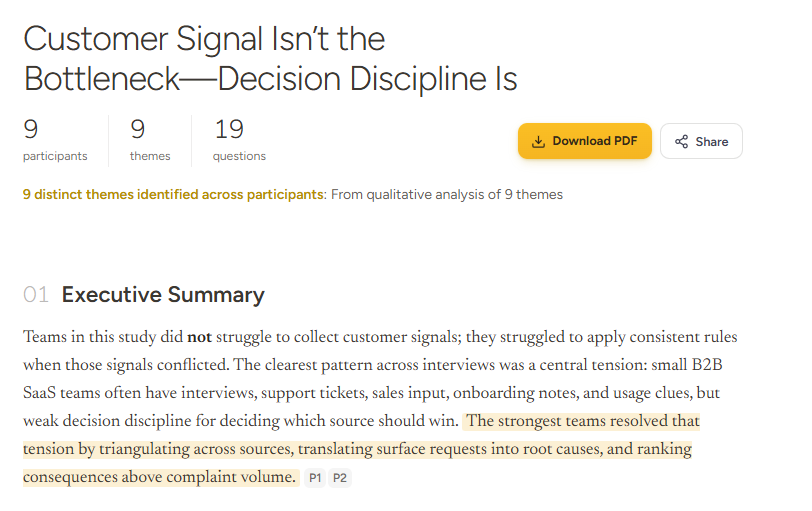
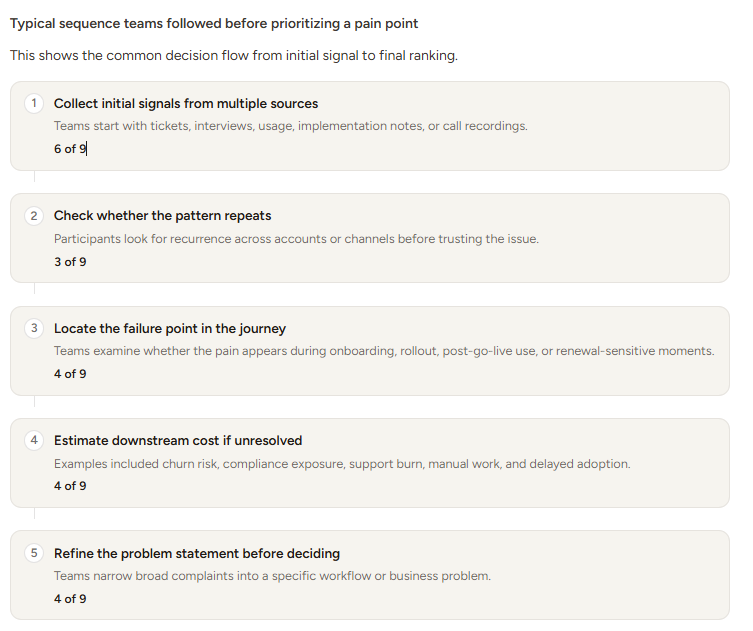
Six of nine started by collecting signals from several sources. Four each placed the failure point in the customer journey, estimated the cost of leaving it unfixed, and narrowed the complaint to one workflow. Five of nine trusted support tickets first, four trusted interviews, and four called sales-led requests the weakest signal. The panel backs the two-source test above, and Articos’s personas recalled 86% of findings from Baymard and Nielsen Norman Group research across 46 studies in a peer-reviewed paper. Nine personas show direction, not proof.
What’s the cheapest or free way to find customer pain points?
The free way costs time, not money: tag your support tickets, read your own and competitors’ reviews, and listen to five sales calls. A shared spreadsheet with source, exact quote, theme, and segment is enough tooling to start. That covers the sources you already own.
For fresh conversations without paying participants, the cheapest paid route is a synthetic study. Articos has a 14-day trial with 900 credits, enough for about two studies, with no credit card required. Paid plans start at $29 a month for Lite (1,200 credits, up to 3 studies a month), then $79 for Starter (3,000 credits) and $199 for Pro (8,000 credits, with white-label reports). A study uses about 400 credits, which works out to roughly $10 per study at base credit levels.
If you’d rather talk to real people and need a recruitment platform, the User Interviews comparison lays out where each approach fits.
Should you combine synthetic and human research to find customer pain points?
Combine them. Human research tells you what customers actually do, and nothing replaces it. Synthetic research is useful earlier: it gives you hypotheses to test and a place to rehearse your questions before you spend a recruited participant’s time.
A sensible order: run a synthetic study to generate candidate pain points and see which questions get vague answers, then take the shortlist to real interviews and tickets for confirmation. Synthetic personas report stated reactions, never behavior. A persona can flag a confusing checkout. It can’t tell you about the day your payment page rejected a card.
Live Calls, which became generally available in September 2026, fit between the two steps. They let you hold a real-time voice conversation with a persona from your panel at any point in a study, using credits from your plan, so you can press on one answer or rehearse a follow-up out loud before you book a real interview. The synthetic vs real users breakdown covers when each is the better call. For regulated work or any decision where you need video evidence, use real participants.
FAQs
A need is the outcome a customer wants. A pain point is the friction they hit while trying to get it. Interviews that start from the job to be done surface both.
AI can speed up tagging tickets and reviews and can simulate interviews to surface hypotheses. The findings still need confirmation against real customer behavior, which is why the two-source test above applies to AI output as well.
Use the customer’s own phrase, then test it. The voice of customer process in our VoC guide covers pulling language from tickets and calls into headlines.