


A team ships a new feature to every customer on Tuesday and learns on Wednesday that it crashes on a popular phone nobody in the office owns. Beta testing is how you find that out first.
So what is beta testing? It is pre-release testing in which real users outside your company try a near-final version of a product in their own environment, then report bugs and feedback before the public launch. It is a type of user acceptance testing and one stage in the wider practice of user research and testing. Most QA references put a beta at a few weeks and one or two test cycles.
Why do products launch with bugs?
Products launch with bugs because the environment where a team builds and tests differs from the one where customers use the product. Developers test on a handful of devices, with clean accounts and sample data, and they know exactly where to click. Customers bring older operating systems, slow connections, years of stored data, and habits no spec predicted. Alpha testing inside the company catches the first layer of defects, and a beta puts the build in front of outsiders who own the devices and data the team does not.
A launch with zero bugs can still fail. If nobody wants the product, a clean release only delivers the bad news faster. Testers who volunteer for a beta are usually interested in the product already, so their enthusiasm says little about the wider market. Checking demand before the build exists is a separate step, covered in our guide to pre-launch validation.
What is beta testing?
Beta testing is pre-release testing in which real users outside the development team use a near-final build in their own environment and report bugs and usability problems. The beta testing meaning holds for software, apps, games, and hardware alike. A beta test comes after internal QA and before general release, and testers usually work black-box: they use the product without seeing the code. Feedback arrives through in-app forms, surveys, interviews, and crash reports. Apple’s TestFlight, for example, lets testers screenshot, mark up, and send comments, and it delivers crash reports to developers. Closed betas invite a selected group, open betas (also called public betas) admit anyone interested, and technical betas recruit testers who can debug and describe problems in detail.
| Type | Who tests | Access | Best for |
|---|---|---|---|
| Closed beta | A small, selected sample of users | Invite only | Feedback on strengths and weak points before wider testing |
| Open beta | Prospects who have shown interest | Anyone who opts in | Problem reports from a wider audience |
| Technical beta | Testers chosen for technical knowledge | Selected by the team | Specialist feedback and debugging detail |
Beta testing or alpha testing?
Alpha testing comes first and happens inside the company. Beta testing comes second and happens with outside users. Both are types of user acceptance testing.
Alpha testers are usually employees, sometimes friends or family, working at the developer’s site or in a lab across several test cycles. Beta testers are external users working in their own environment, and a beta typically needs only a few weeks. Alpha estimates product quality, and developers can fix critical bugs on the spot. Beta estimates customer satisfaction, and much of the feedback lands in a later version instead of the current build. A team that skips alpha pushes avoidable bugs into the beta and spends tester goodwill on problems it could have found alone, so the beta build should be close enough to final that testers hit new problems instead of known ones.
| Factor | Alpha testing | Beta testing |
|---|---|---|
| Testers | Employees, sometimes friends and family | External users |
| Location | Developer site or lab | The user’s own environment |
| Method | White-box and black-box | Mostly black-box |
| Cycles | Multiple | One or two |
| Goal | Estimate product quality | Estimate customer satisfaction |
How do you run a beta test?
A beta test runs in five steps: set a goal, recruit testers, distribute the build, collect feedback, and triage reports. Do a dry run first. Testing your beta testing setup with five internal people catches broken invite links and unclear instructions before outsiders see them.
- Write one goal and an exit rule, such as “no open crash bugs on the top three devices.”
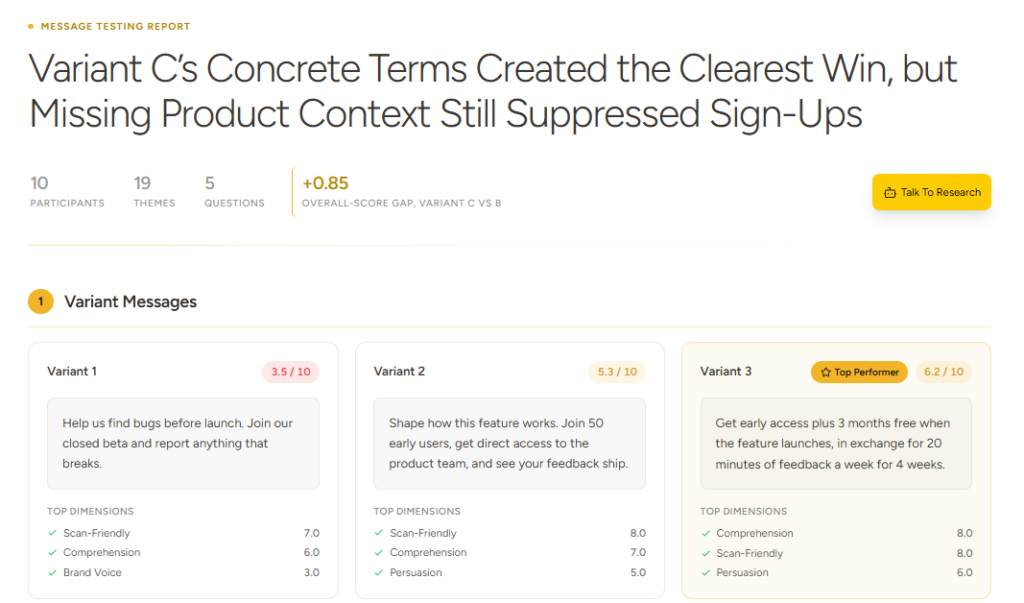
- Recruit testers who match your target customer, because feedback from the wrong segment misleads. The wording of the invitation also decides who signs up (our test below shows how much). Our guide to participant recruitment covers sourcing.
- Distribute the build through TestFlight, Google Play Console, or a direct link.
- Give testers one feedback channel and a short list of tasks.
- Triage reports weekly, fix what blocks release, and log the rest for later versions.
How many beta testers are enough?
Most closed betas run with 30 to 120 testers, according to Centercode, a beta management vendor. Published guidance varies by product type, and these figures are working heuristics from vendors and trade publications, not statistical results. A test of one simple flow needs fewer testers than a beta that must cover several device and operating system combinations.
| Scenario | Typical testers | Source |
|---|---|---|
| Small independent app | 5 to 10 | TechBeacon |
| Casual-use app | 25 to 40 | TechBeacon |
| Functional test cycle, simple flows | 20 to 50 | BetaTesting |
| Typical beta program | 30 to 120 | Centercode |
| Game | 200 or more | TechBeacon |
| ±5% margin at 95% confidence (yes/no metric, large population) | About 385 | Standard sample-size formula |
Adding testers past the point where reports repeat adds cost without new findings. Nielsen Norman Group’s research on usability found that each participant uncovers about 31% of the problems on a flow, and that five users surface roughly 85% of them. Beta vendors report the same repetition in bug reports. Each distinct segment, such as iOS and Android users, needs its own adequate sample. For the math behind these numbers, see our guide to sample size for user research.
What are the best beta testing platforms?
The best beta testing platform depends on the job: distributing builds, managing testers and feedback, or watching real people use the product on video. Many teams pair two, such as TestFlight for delivery and a survey or interview tool for the feedback itself, because distribution platforms hand over builds and crash reports but do not explain why a tester gave up on a task.
| Platform | Best for | Key detail | Cost |
|---|---|---|---|
| TestFlight | Apple platform builds | Up to 100 internal and 10,000 external testers; first external build needs App Review | Free to use; Apple Developer Program is $99 a year |
| Google Play Console | Android builds | Internal testing for up to 100 testers, plus closed and open tracks | $25 one-time registration |
| Centercode | Managing a beta program | Tester recruitment, feedback collection, and triage; publishes a free Test Size Calculator | Varies by plan; see vendor |
| UserTesting | Video feedback from real participants | Recorded sessions rather than build distribution | See vendor |
One Google Play rule catches new publishers off guard. Personal developer accounts created after November 13, 2023 must run a closed test with at least 12 testers opted in continuously for 14 days before applying for production access, according to Google Play Console Help. Teams that want video-based feedback without an enterprise contract can compare options on our UserTesting alternatives page.
What’s the cheapest or free option?
The cheapest way to run a beta is TestFlight or Google Play Console, which cost nothing per test once you hold a developer account ($99 a year for Apple, a one-time $25 for Google). Your own customer list, a waitlist, and communities where your target users already gather supply testers at no cost beyond your time.
The cheapest way to check whether the product deserves a beta is a free concept test with synthetic users. Articos offers a 14-day free trial with 900 credits (about two studies) and no credit card. After that, Starter is $79 a month for 3,000 credits (about 7 studies) and includes Live Calls (real-time voice conversations with a simulated persona). Pro is $199 a month for 8,000 credits (about 20 studies) and adds white-label reports. Prices are current as of October 2026; confirm on the Articos pricing page.
Should I combine synthetic and human research, not choose one?
Combining synthetic and human research works better than choosing one, because each answers a different question. Real users on real devices find crashes and compatibility bugs, so the beta stays human. Synthetic research settles the earlier question: whether the concept, and the wording of the invitation, deserve a beta at all.
For this guide we ran an Articos message test: 10 synthetic personas, including busy founders and competitor-tool users, scored three beta invitations as marketing emails. The perk-led invitation scored 6.2 out of 10, the influence-led one (“Shape how this feature works”) 5.3, and the bug-focused one 3.5. Confidence was medium, so the report advised testing a version that pairs the free months with that “shape the feature” language.
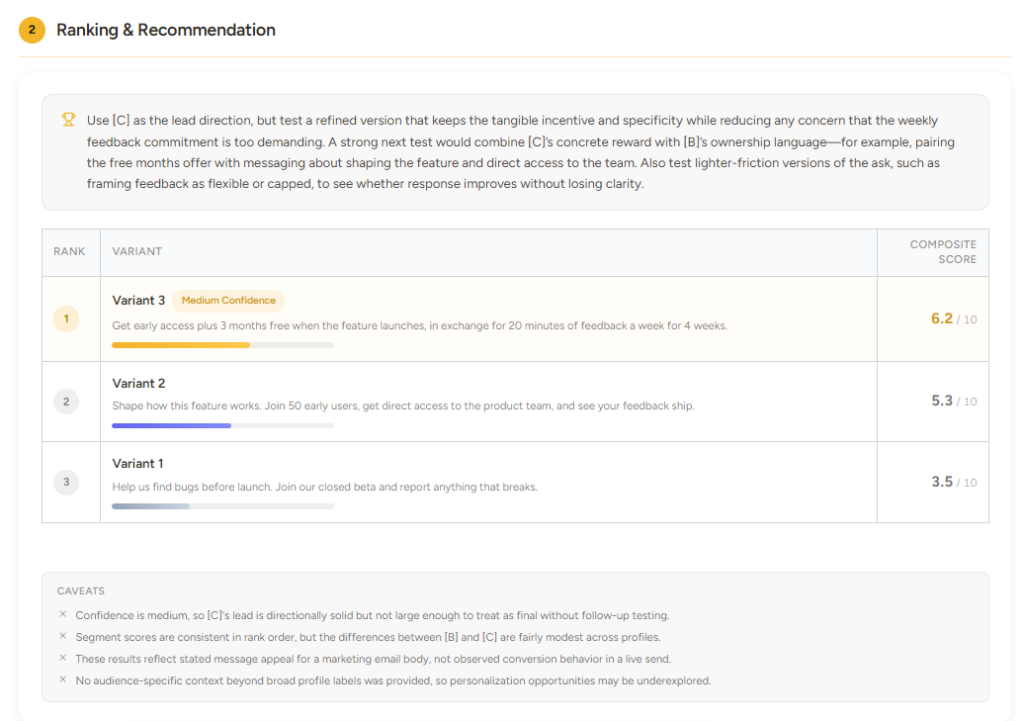
The scores measure stated appeal, not real sign-ups, and no persona can tell you whether a build crashes. Articos reports 86% theme recall against Baymard Institute and Nielsen Norman Group findings across 46 studies. Use concept testing and AI user research for the choices before a beta, then start a free Articos research on the feature you plan to test next.


